Problem
The client is a cafe whose one store is split across 2 buildings. Four part-time staff work 4 to 5 hours a day, 4 to 5 days a week, which comes to 16 to 25 hours a week and makes them eligible for weekly holiday pay. The owner wanted staff, inventory and taxes managed systematically even while away. There were about 50 items across 2 storerooms but no way to manage inventory, and the owner filed taxes as a simplified taxpayer without an accountant. Sales data could only be exported from the POS as Excel.
The owner's biggest worries were managing and hiring staff, uneven drink quality and frequent time-off requests.
Goals
- Build mobile first so it's easy for staff, and support web, iOS and Android.
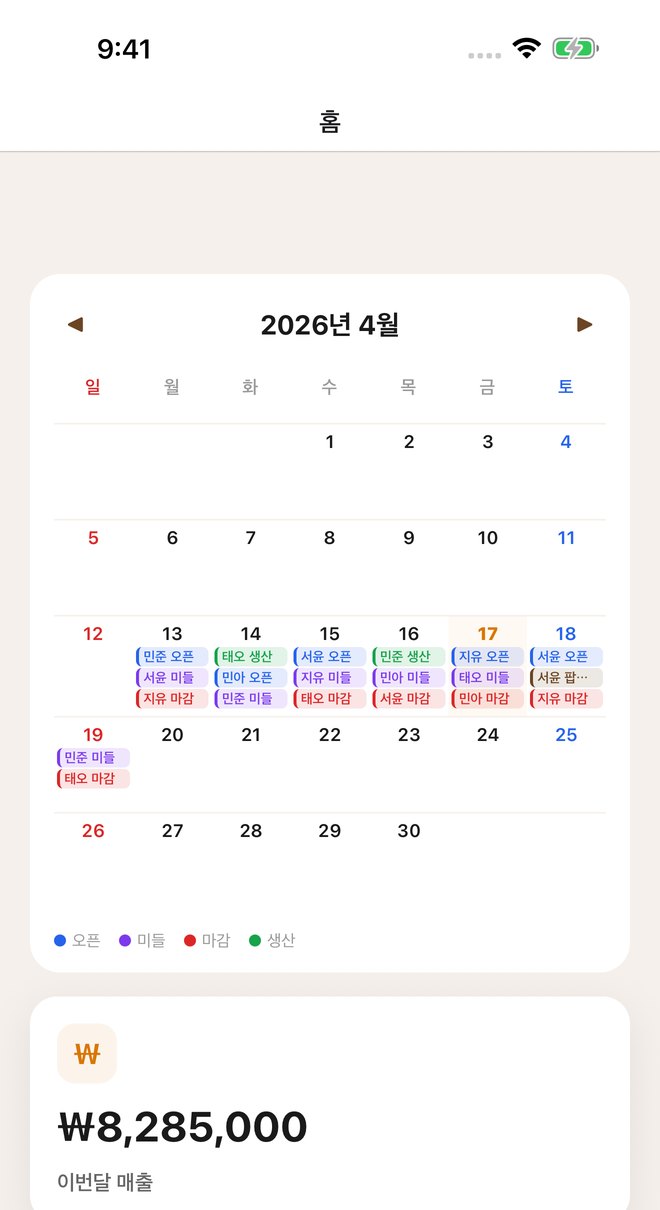
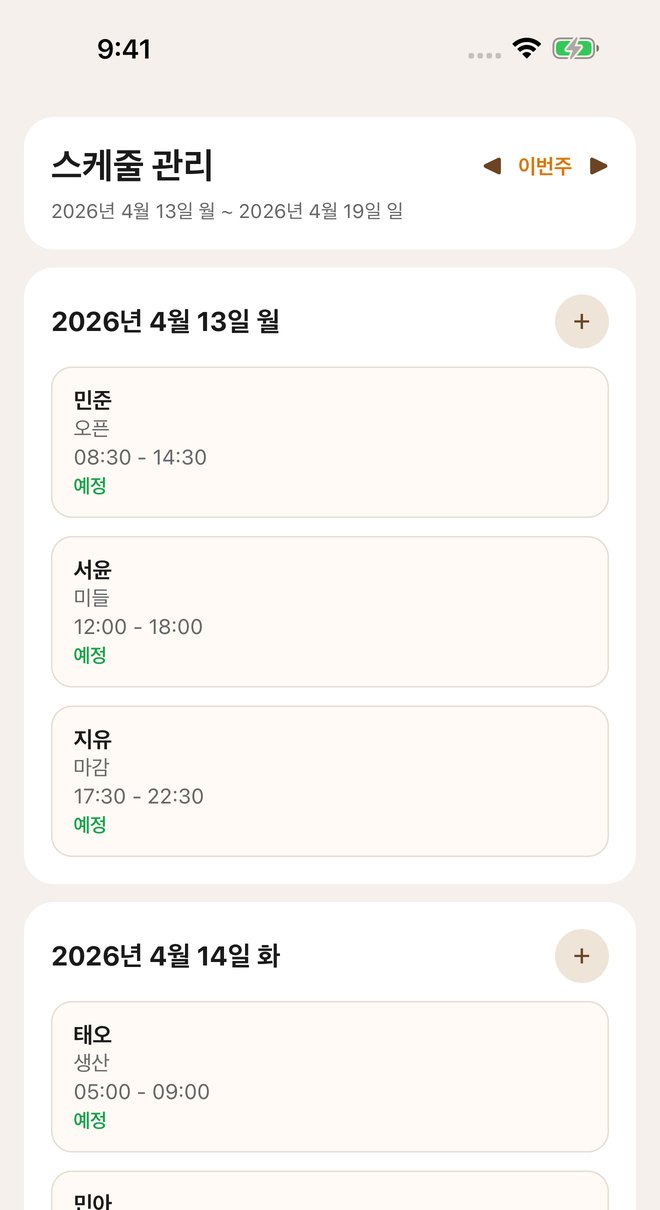
- Schedule 4 shift types (opening, middle, closing, production), and allow clock-in and clock-out only at the store.
- Calculate weekly holiday pay and simplified-taxpayer VAT automatically.
- Manage inventory in 2 storerooms, linked to recipes.
How I got there
Apr 2026
From Supabase to Django in a day
The first requirements were 25 items across staff, inventory and taxes. I started on Supabase, but after a day it was slow and awkward for managing data, so I dropped the finished work and moved to the Django admin with business logic on the server. Three days later I split the DB into one schema per store so other cafes could use it too.
Apr to Sep 2026
Fitting the attendance check to the store
From the start the plan was to check the Wi-Fi name and fall back to the IP when it can't be read. In practice the app couldn't read the Wi-Fi name reliably, so now the owner registers the allowed networks and the app picks up the IP automatically. Managers can clock in staff who fail the check, and since September staff can fix their own records within one of 3 modes the owner chooses.
May to Sep 2026
Scope that grew with use
Recipes (May), a store homepage (August) and gift-set pre-orders (September) were added one after another.
How it works now
Store separation, attendance checks, pay and tax calculation and inventory deduction, in the order they run.
- 1
Each cafe gets its own PostgreSQL schema, and the store info in the login token is verified on every request.
- 2
Clock-in passes if the store's Wi-Fi name matches. Where the name can't be read, it checks the registered IP instead.
- 3
It calculates weekly holiday pay for anyone working 15 or more hours a week, and estimates tax by applying the simplified-taxpayer value-added rate.
- 4
Running a recipe converts g and mL using each item's density and deducts stock. A request key and a row lock make sure stock is deducted only once, even if the same request comes in twice.
- 5
Staff and the owner use both the Expo app and the Next.js web.
Key decisions
Moving from Supabase to Django, with one schema per store
- Why
- The Supabase setup I started with was slow and awkward for data management. While moving, I made it usable by other cafes too, separating stores by schema and URL path.
- Alternatives
- Stay on Supabase, or split by row within one schema
- Trade-off
- Migrations have to run separately for each store.
An IP fallback for the Wi-Fi check
- Why
- Reading the Wi-Fi name on iOS needs a separate permission, and on the web it can't be read at all. So when the name can't be read, it checks the registered IP.
- Alternatives
- Check by Wi-Fi name only
- Trade-off
- An IP check is less accurate, so I backed it up with managers clocking staff in on their behalf and with approvals for record corrections.
Hard problems
This includes problems I caught before release.
Pressing clock-in twice at once left 2 records
If the same staff member pressed clock-in twice at the same moment, 2 records with the same time were created, so pay could be calculated twice. There were related problems too: approving a record correction could overwrite a clock-out made in the meantime with an old value, and a record left open without a clock-out could later be closed as a shift dozens of hours long. About 7 minutes after the feature went in, an AI code review (Codex) caught it and I fixed it.
Why it was hard
The code already used row locks (select_for_update), so it looked like it was locking. But you can't lock a row that doesn't exist yet. Tests ran on SQLite, where row locks don't work, and there was no unique constraint as a last safety net either.
How I traced it
1. How does the clock-in API prevent duplicates?
It checked for an open record and then created a new one, with no transaction and no lock.
2. Is the overlap check in the correction path safe?
It locked only that person's existing records. If the overlapping record doesn't exist yet, 0 rows get locked.
3. Will the DB stop it at the end?
The attendance model had no unique constraint.
4. Then what should be locked?
Instead of the record that doesn't exist yet, I decided to lock that staff member's account row to put the requests in order.
Root cause
The clock-in/out and correction paths did 'check, then create' with no lock, and where there was a lock, it targeted rows that didn't exist yet, so it actually locked nothing.
- 1Any open record? None
- 2Any open record? None
- 3Creates a clock-in record
- 4Creates a clock-in record: 2 records at the same time
- 5(After the fix) Locks the staff account rowWaits for the lock, checks again and is rejected
Fix
Clock-in, clock-out, correction requests and approvals are all wrapped in a transaction that first locks that staff member's account row. After getting the lock, it checks again for open records and overlaps. On approval, it re-checks the rules (within 7 days, no future times, at most 16 hours) and rejects it if the record changed after the request.
Before
clock_in():
    if exists(open record of user): reject
    create(record)                      # no transaction, no lock
check_overlap():
    lock(records of user)               # locks 0 rows if no overlapping record exists yet
After
@atomic  clock_in / clock_out / submit / approve:
    lock(user row)                      # lock the person instead of a record that doesn't exist yet
    re-check open record and overlap
    approve: re-check within 7 days, not in the future, at most 16h
reject if the record changed after the requestVerification
- 4 tests (rejects approval if the record changed after the request, counts only the latest clock-in as an open record, refuses clock-out for records open more than 16 hours, re-checks the 7-day rule on approval)
- There's no test that reproduces the concurrent requests themselves. Row locks don't work on SQLite, the test DB
Prevention
- Every attendance write goes through the same lock order.
- A record left open more than 16 hours without a clock-out isn't closed by a clock-out.
Overnight shifts and days with 2 shifts getting mixed up
Shifts that crossed midnight got the lateness check wrong, and on days with 2 shifts, the morning clock-in was counted as the clock-in for the evening shift.
Why it was hard
The assumption 'one shift and one clock-in record per person per day' ran all through the screen code. Looking at a single daytime shift, nothing was wrong.
How I traced it
1. How does it find the clock-in record for a shift?
It looked for only one per person per day.
2. How are times compared?
As minutes since midnight, so for overnight shifts whose end is earlier than their start, the order flipped.
3. Which records does it load?
Only today's clock-in records, so it missed shifts that started the night before.
Root cause
Shifts and clock-in records were tied to a single date. Shifts weren't treated as time ranges.
Fix
When building a shift's range, if the end is the same as or earlier than the start, 24 hours are added to the end. A clock-in record counts for a shift if it falls in the window from 2 hours before the shift starts until it ends. I put the same rule in web and mobile.
Key code
shiftWindow(shift):
    start, end = shift.start, shift.end
    if end <= start: end += 24h          # shift that crosses midnight
    return [start, end)

recordForShift(shift, records):
    window = [shift.start - 2h, shift.end)
return first record whose clock_in is in windowVerification
- 6 tests (lateness check for overnight shifts, a morning record not counted for the evening shift and more)
Prevention
- I aligned web and mobile to use the same matching rule.
Takeaway
Shifts are handled as time ranges with a start and an end.
Results
- Platforms
- Web, iOS, Android
- Backend tests
- 325 test functions
- Shift schedules, attendance, payroll, inventory, recipes, taxes, pre-orders and the website are all managed in one system.
- Data is separated per store so other cafes can use the same system.