Problem
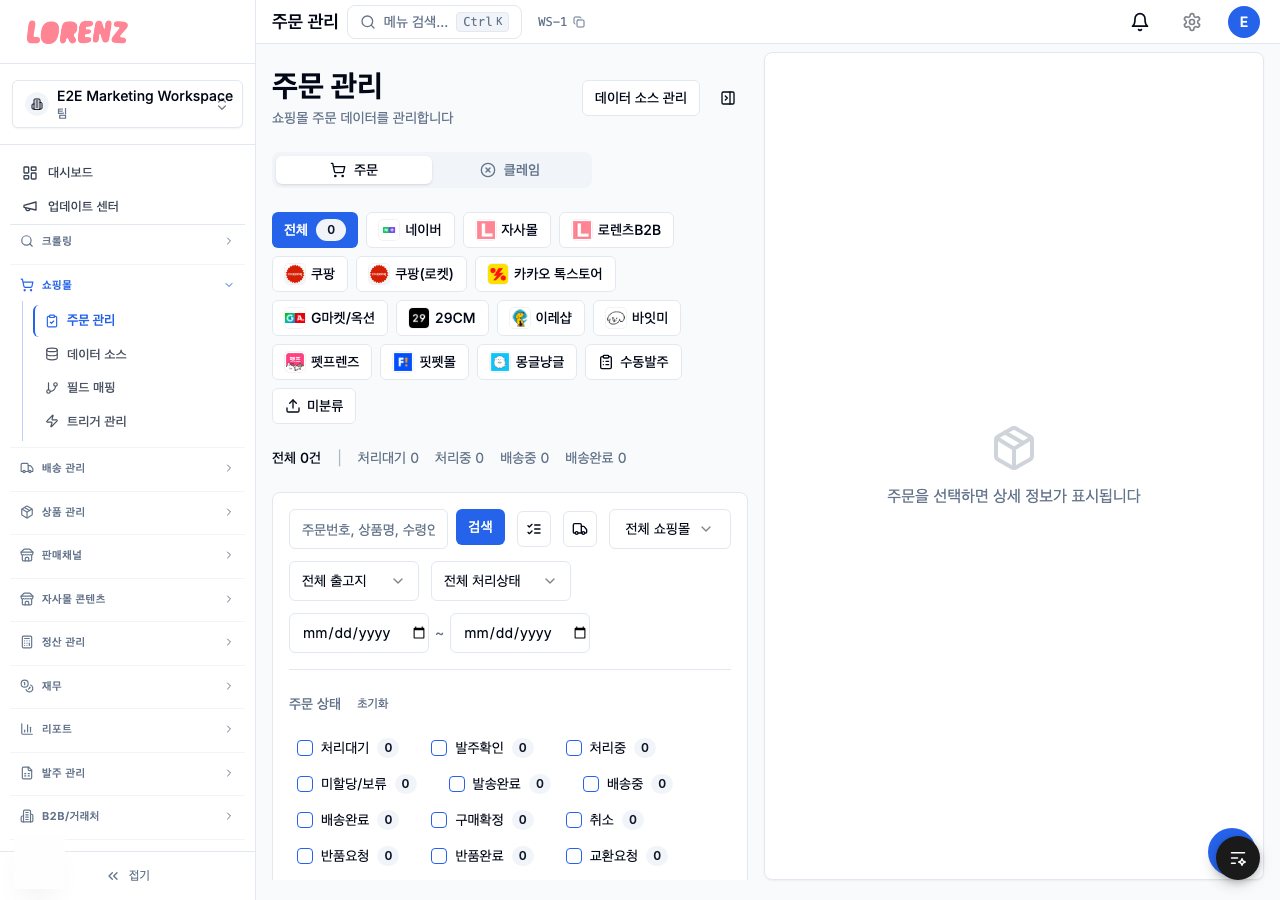
LORENZ sells pet food and treats through its own online store and several sales channels. Staff copied store orders and entered them one by one, checked delivery status by hand on courier websites and typed stock counts into several places separately.
The team is 7 people, and apart from the CEO none of them were used to AI tools. Customer conversations were scattered across Naver TalkTalk and calls on the work phone, and unprocessed call recordings were piling up on that phone.
Goals
- Handle orders from many channels on one screen, and connect inventory, shipping, purchasing, settlement and customer service.
- The AI agent only reads the DB. Changes go through existing business APIs, and only after a staff member approves in Slack.
- The agent never does anything for staff that they couldn't do in the admin screen themselves. It checks the same menu permissions.
- Regular deploys don't change the DB, and rollbacks with a mismatched schema are blocked.
How I got there
Dec 2025
Starting with shipment tracking
The first feature let staff upload tracking numbers from Excel in one go and checked delivery status through courier APIs. Orders from sales channels without an API came in through a Playwright scenario engine.
Jan 2026
Channel orders on one screen
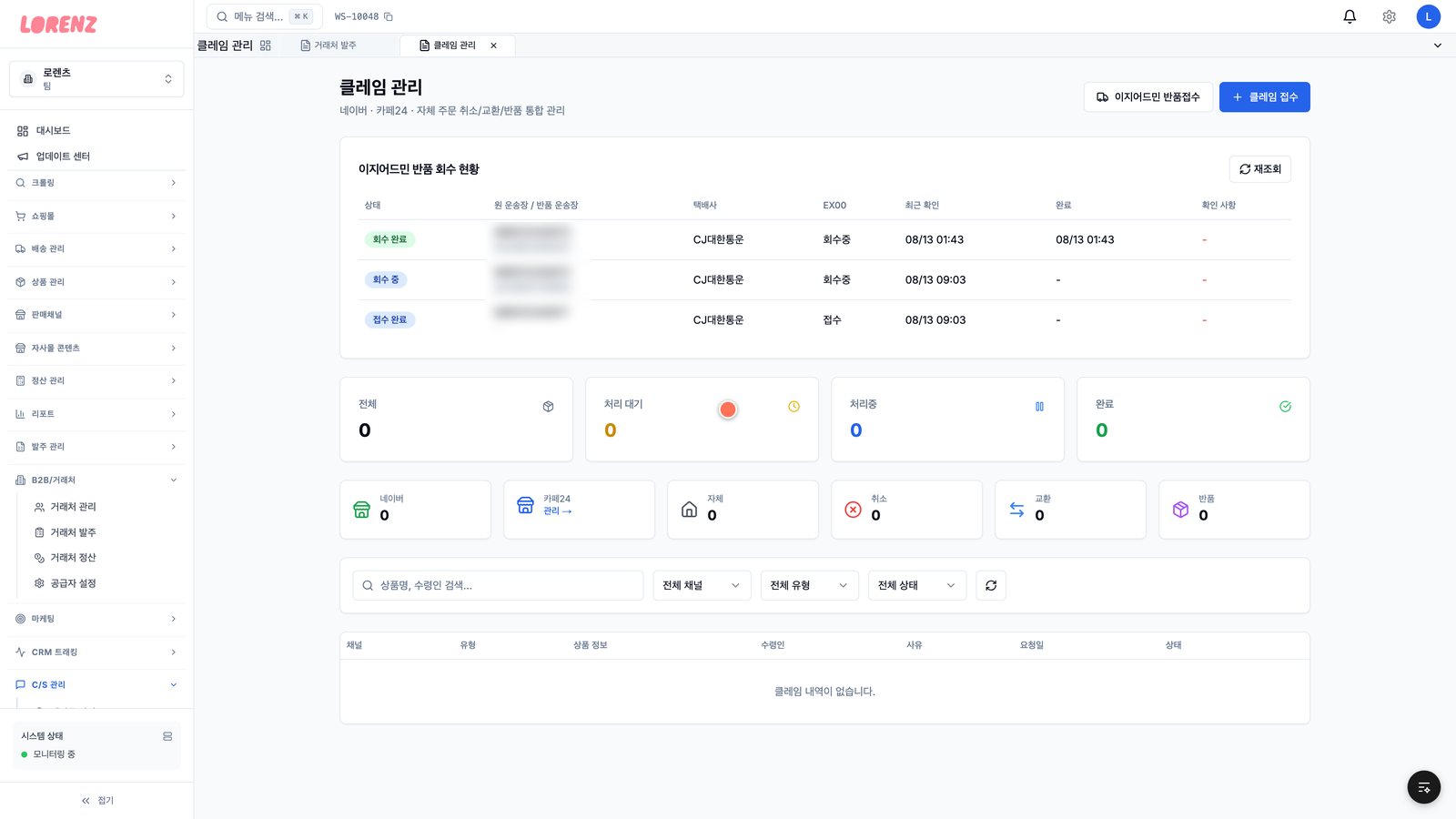
I merged Naver Commerce API orders into a single orders page, then added manual orders and Cafe24 order sync. Registering a tracking number now marks the order as shipped, so staff don't change the status by hand.
Jun to Jul 2026
Two deploy incidents, then deploys as transactions
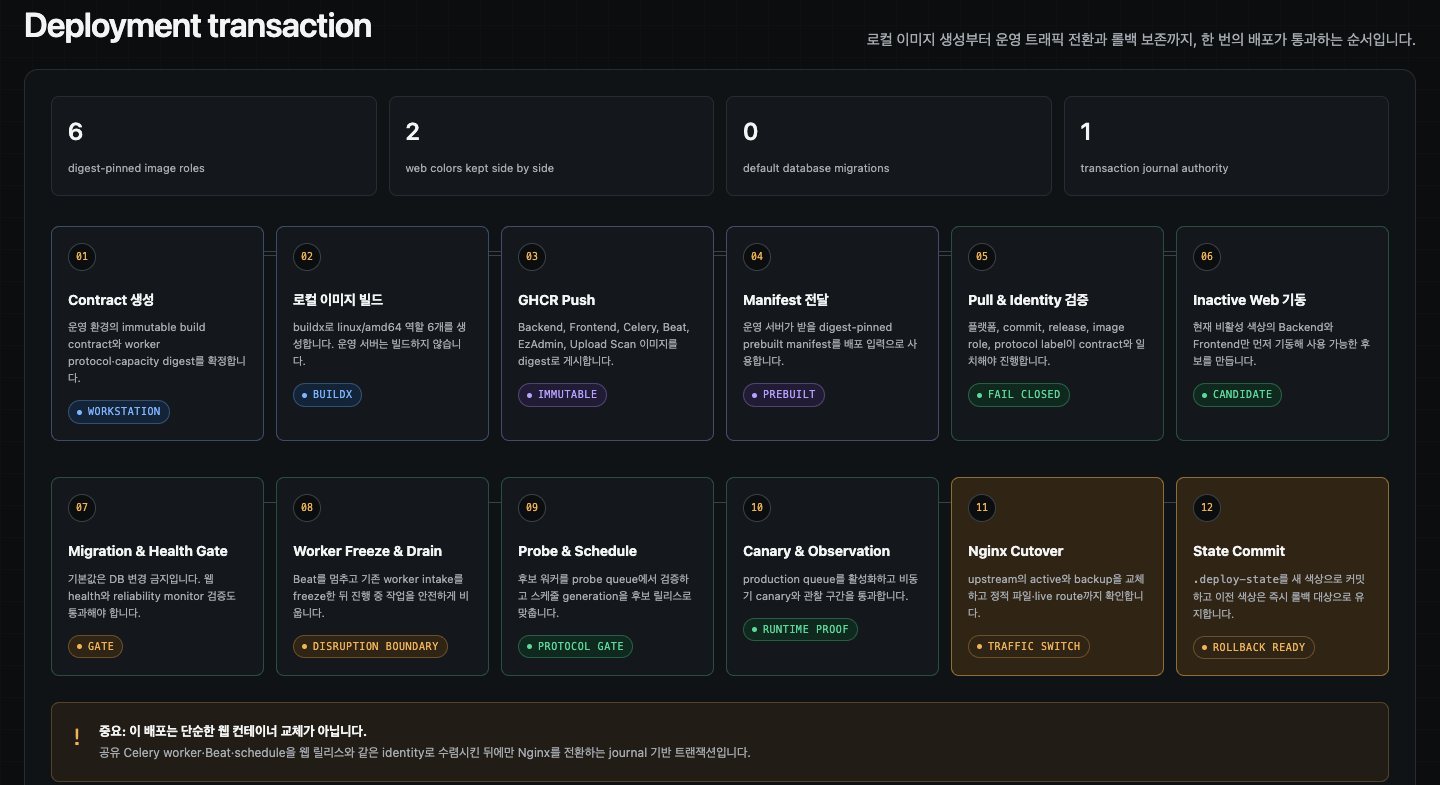
Deploys had been blue-green since January, but two things went wrong in June. A deploy didn't restart the EZAdmin worker, so it ran 2-week-old code, and a new required column made the whole EZAdmin order sync fail. The same month, a stale environment was activated and served old code, and the failed Nginx switch went unnoticed. In July I added a deploy journal, worker generation checks and a canary.
Sep 2026
Tracking each shipment on its own schedule
A sweep every 6 hours checked about 2,900 tracking numbers at once. It checked 328 of them twice and never checked 157 extra EZAdmin tracking numbers, and a problem shipment could wait up to 6 hours. Now each tracking number gets its own next check time, and every 5 minutes only the ones that are due are checked, up to 250 per run.
Mar to Oct 2026
From a command bot to an agent that asks for approval
In March I opened an MCP server that could only read internal APIs. The first Slack bot in July had no AI model, accepted 10 fixed commands and refused writes. In September a read-only pilot for the CEO grew from 4 read tools to 14, and I compared 6 agent tools to pick the engine. In October I opened it to all 7 staff. Of 30 requests it couldn't handle over 3 weeks, 13 were writes, so I added write actions that run after approval.
How it works now
From order collection to the staff screens, the Slack agent and deploys, this is how it is put together.
- 1
Orders come in from 13 sales channels, manual orders and EzAdmin. Channels without an API are handled by a Playwright scenario engine.
- 2
Django and Celery handle order sync, settlement and notifications.
- 3
Staff work in the order hub, claims and B2B screens of the Next.js admin.
- 4
An MCP server exposes the internal APIs as read tools and approval tools.
- 5
The Slack agent 'Ronnie' answers questions. Requests that change data are posted as proposal cards and run only after the staff member who asked approves them.
- 6
Customer service call recordings go through speech recognition and summarization, become call records and get posted to a Slack channel. Clicking a Slack button makes a Chrome extension open the matching TalkTalk chat room and customer info.
- 7
Deploys first start the standby side (blue or green) from digest-pinned images, and once the worker checks and the canary pass, Nginx traffic is switched over.
Key decisions
The agent touches data only through MCP and approvals
- Why
- Letting it write SQL directly skips business rule validation. A model mistake, or instructions mixed into outside input, could change data directly. So I exposed only the existing business APIs as tools, and writes run only after the staff member who asked approves them.
- Alternatives
- I compared 6 agent tools and ruled out letting the agent write to the DB directly from the start.
- Trade-off
- Each kind of write has to be added one at a time. Of 30 requests it couldn't handle over 3 weeks, 13 were write requests, so I used that list to add more approval actions.
Adding worker generation checks and a canary to blue-green deploys
- Why
- Even with blue-green deploys in place since January, there were two incidents in June. The old way ran migrations while the previous version's web and workers were still reading old columns, and it didn't check whether workers had restarted on the new code or whether the schema matched on rollback. So I turned deploys into a transaction that leaves a record.
- Alternatives
- Keep the existing blue-green deploy as it was
- Trade-off
- The process got more complex. One problem also remained: a generation mismatch was rejected only after a 30-minute build had finished.
A dedicated least-privilege extension for TalkTalk
- Why
- The server can't build links to Naver TalkTalk chat rooms directly. A general browser automation tool would mean running a local server on every staff PC and storing cookies separately, so I built a separate, dedicated extension with only the permissions it needs.
- Alternatives
- A general browser automation tool, or adding the feature to the existing recording extension that has access to all sites
- Trade-off
- It only works in staff browsers, and shipping it requires Chrome Web Store review.
Hard problems
This includes problems I caught before release.
The same order saved twice
On one sales channel, the same order line was saved as 2 rows that differed only in their product order number. This went on for about 20 days after the change that caused it, and each duplicate row could get its own tracking number, settlement and matching history.
Why it was hard
Code comments and commit messages said 'the unique key prevents duplicates'. But the 2 collection paths built the product order number in that key differently, so the unique constraint never kicked in, and both rows looked like normal data.
How I traced it
1. Wouldn't the unique key stop it?
The function that builds the key joins only the non-empty codes. Read from the screen, only the product code was there, so it became 'number|product'. Read from Excel, it became 'number|item|sale|product|option'.
2. Wouldn't the fallback path skip orders that already exist?
It decided 'order not found' by order number alone. If it ran before Excel, the order looked like it didn't exist yet.
3. In what order do the 2 paths run?
In the change that caused the problem, the fallback call was placed before Excel parsing and saving.
4. Can I make it happen again?
I recreated the situation where orders had moved to 'preparing for shipment' with a driver stub and reproduced it exactly.
Root cause
The order collection workflow ran the fallback path, which reads the 'preparing for shipment' screen, before the Excel save. Because the collection step moves paid orders to 'preparing for shipment', the fallback path saw the same orders, and they passed the 'order not found' check by order number.
- 1Collection step moves orders to preparing for shipment and downloads Excel
- 2Same order shows on the preparing-for-shipment screenNot saved to the DB yet
- 3Judged 'order not found', saved with the short key
- 4After parsing, tries to save with the full key
- 5Keys differ, so a new row is created: the same line in 2 rows
Fix
I changed the order so the Excel save runs first and the fallback path after it. The fallback result decides success only when Excel has failed. I removed existing duplicates with a cleanup command. It picks the row to keep (first a row with a tracking number, then a row with the full Excel key), moves references to that row and then deletes the other.
Before
    self._scrape_preparing_orders_into_db(driver, result)
if file_path is None:
    return result
orders = self.parse_excel_file(file_path)
saved, new, upd = self.save_orders_to_db(orders)
After
    if file_path is not None:
        orders = self.parse_excel_file(file_path)
        if orders:
            saved, new, upd = self.save_orders_to_db(orders)
        else:
            excel_parse_failed = True
    self._scrape_preparing_orders_into_db(driver, result)  # after Excel
result["success"] = (not excel_parse_failed) or result["scraped_new"] > 0

# cleanup command: delete only when all 3 values match
return (loser.total_price == survivor.total_price
        and loser.quantity == survivor.quantity
and loser.product_name.strip() == survivor.product_name.strip())Verification
- In a test that reproduces orders moved to preparing for shipment, confirmed only one row remains and that it has the full Excel key
Prevention
- I left a code comment explaining why the run order matters.
- The cleanup command defaults to preview. It touches orders that have a tracking number or aren't in an active state only when explicitly allowed.
Takeaway
A unique key prevents duplicates only when every save path builds the same key.
Stopping an irreversible migration right before deploy
While preparing a release with a migration that copies data and drops an old column, I found that with the existing deploy order, the column would be dropped while the previous version's web and workers were still reading it. I blocked the regular deploy and switched to a 503 maintenance cutover, and stopped before any production data or traffic changed.
Why it was hard
The existing tests for that release all passed: 577 backend and 395 deploy. The worker protocol check only looks at whether the message format matches, and with the previous containers still around, rollback looked safe too. None of these tests checked the deploy order or the recovery paths.
How I traced it
1. Can I leave the migration to the automated deploy?
The deploy order was: start the new web, migrate, check workers, stop the old workers. The previous version is still alive at the moment the column is dropped.
2. If something goes wrong, can't I just roll back?
The recovery paths didn't check the schema. Data that had moved to a relation linking many items couldn't go back to a single foreign key, and faking the migration as applied wasn't an answer either.
3. What about a state where the copy ran but the drop didn't?
Half-applied states had to be blocked too, so I added that combination as a test input.
4. Where should progress be recorded?
It had to survive even if the deploy record ended, changed or got corrupted, so I made it decide from a state file only root can write.
Root cause
The deploy script's migration check (ensure_safe_migration_plan) allowed irreversible migrations in online deploys too, and there was no schema check anywhere in the worker restart, the Nginx switch or reverse recovery.
- 1New version web startsWorking normally
- 2Copy dataKeeps using the old column
- 3Drop the old columnQueries the dropped column, error
- 4Check workers, stop old workersAlready too late
- 5Fails, so it rolls backRestarts the previous version without a schema check
Fix
If a pending migration copies data or drops a column, the regular deploy is refused. A transition like this stops traffic, drains in-progress work and verifies a backup restore on an isolated PostgreSQL before going ahead. When the transition finishes, it records a 'schema recovery floor', and no code below it can start, whether by rollback or by restarting an old container.
Key code
# stop the regular deploy if a pending migration includes a schema transition
while IFS= read -r migration; do
  case "$migration" in
    <data-copy>|<column-drop>|<create-copy-drop>)
      error "Schema transition requires a quiesced cutover and verified database recovery"
      return 1 ;;
  esac
done < <(pending_migration_names)

# check the floor before every worker start, Nginx switch and reverse recovery
start_workers() {
  schema_release_allowed "${GIT_COMMIT:-}" || return 1
reverse_deployment_transaction() {
  schema_entry_allowed || return 1
schema_release_allowed "$JOURNAL_PREDECESSOR_COMMIT" || return 1Verification
- First confirmed that 3 new regression tests fail on the pre-fix script
- Grew the deploy regression tests to 398, then 418, then 436, passing each time
- Rehearsed with a restore on an isolated PostgreSQL, and confirmed the real gate accepts the new release and refuses the old one
Prevention
- After a schema transition, recovery only goes forward.
- A rollback has to satisfy both the standby side and the schema floor.
- I also restored the 503 notice and error handling that were missing from the host Nginx.
Takeaway
The worker protocol check only looks at the message format. Even with old containers still around, code below the schema floor doesn't start.
The canary check that killed a worker and blocked the rollback
Blue-green deploys failed twice in a row. Traffic was unaffected, but the job workers were left on the new version and the web on the old one, out of sync, and the next deploy detected the mismatch and was refused from the start.
Why it was hard
The logs only showed readiness check failures, and the same message also repeats during a normal boot. Raising the retry settings didn't help, and the only trace of running out of memory was in the kernel log. The rollback also had to pass the same Nginx check again, so it failed in the same place.
How I traced it
1. Is boot just slow?
Raising the readiness retries didn't help.
2. What state is the container in?
Its restart count kept climbing. It was dying and coming back.
3. Why is it dying?
The kernel log had 'Memory cgroup out of memory: Killed process (celery)'.
4. What ate the memory?
Inside a worker that normally uses 560MiB, about 73% of its 768MiB limit, the canary was starting another Python and Django with docker exec.
5. Why did the rollback fail?
The rollback failed again at the same candidate check in the Nginx switch step, leaving a state that had to be cleaned up by hand.
Root cause
The upload scan worker's 768MiB memory limit couldn't hold the resident process and the canary check process together. The rollback also went through the same Nginx check as the switch, so it got stuck at the same step.
- 1Worker activatedUsually about 560MiB / 768MiB limit
- 2beat startsAbout 200MiB of headroom left
- 3Turns on the queues and runs the canary with docker execCheck process loads Django
- 4Over the limit, the kernel kills the worker
- 5Canary fails, deploy aborts
- 6Rollback fails at the Nginx stepWorkers on the new version, web on the old version
- 7Next deploy detects the mismatch and refuses
Fix
I raised the upload scan worker limit to 1,536MiB and beat to 1GiB, and increased the worker start timeout from 60 to 240 seconds. The limits are baked into image labels, so I rebuilt the deploy contract and the images, and the script refuses settings that lower the limits.
Before
WORKER_START_TIMEOUT="${WORKER_START_TIMEOUT:-60}"
validate_minimum_capacity <BEAT_LIMIT> "${..:-512m}" 512
validate_minimum_capacity <UPLOAD_SCAN_LIMIT> "${..:-768m}" 768
After
WORKER_START_TIMEOUT="${WORKER_START_TIMEOUT:-240}"
validate_minimum_capacity <BEAT_LIMIT> "${..:-1g}" 1024
validate_minimum_capacity <UPLOAD_SCAN_LIMIT> "${..:-1536m}" 1536Verification
- Added a test that checks the default memory limits are OOM-safe, and updated the existing expected value from 768m to 1,536m
- Measured afterward: upload scan worker memory usage at 37.94%
Prevention
- Before a deploy, it checks that memory usage for all 4 worker types is under 70%.
- Regular image cleanup is banned during recovery, and images referenced by deploy records can't be deleted.
- I documented a 5-step recovery procedure for when the web and worker versions are out of sync.
Takeaway
Raising readiness retries didn't fix it. I don't clean up images during recovery, since that can delete the image to roll back to.
Results
- Order hub
- 13 sales channels and manual orders on one screen
- External integrations
- More than 25, including couriers and bank account lookups
- Shipment tracking
- From one sweep every 6 hours to a schedule per tracking number, every 30 minutes to 12 hours
- Ops agent
- 30-plus MCP tools, 8 kinds of actions that run on approval
- Agent check
- 27 of 28 role-based questions passed
- Approval cards
- Posted to Slack within about 10 seconds of a request
- Test files
- 1,264 backend, 517 frontend
- Staff no longer copy and enter store orders, or look up deliveries one by one on courier websites.
- Instead of asking a coworker for units per case or minimum order quantity, staff ask Ronnie in Slack.
- Customer service calls are kept as summarized call records and show up right in a Slack channel.
How we worked
- I built a test set from 40 work questions staff had actually asked, and checked the agent by sending 28 role-based questions over DM. 27 passed, and the one that failed turned out to be a backend permission bug, which I fixed.
- I collected the requests the agent couldn't handle and used them to decide the order of the next features to build.
- I set a rule that answers corrected by staff take priority over the internal wiki.
- I wrote plain-language install and user guides for non-developer staff, and put announcements, feature requests and a bug board inside the admin screen.